
Google Ads Conversion Tracking: How to Set It Up and Trust It
Set up Google Ads conversion tracking for leads: pick the right actions, tag your site, track calls, verify the data and feed real lead quality back to bidding.

Google Ads Conversion Tracking: How to Set It Up and Trust It
Google Ads conversion tracking records what people do after they interact with your ad, such as submitting a form, calling your office or buying something, and reports it back to your campaigns. To set it up, you decide which actions count, install the Google tag on your site, create one conversion action per type of lead, then test that each one fires. If you want leads rather than just clicks, this is the step that decides whether your budget is optimized or wasted.
Below is a practical walkthrough written for lead-driven organizations: law firms, local governments, and service businesses where a conversion is an inquiry, not a shopping cart.
MediaclickTurn Ad Clicks Into Qualified LeadsMediaclick combines performance-driven advertising with conversion-focused websites to help law firms and local governments generate qualified leads.Explore Mediaclick’s solutions
TL;DR
A conversion is any action you define as valuable. Create a separate conversion action for each type, such as form submissions, calls and offline sales.
Install the Google tag across your whole site, then add event tracking for the specific lead action. Verify with Tag Assistant and the Status column.
Mark only your real lead actions as primary. Everything else should be secondary, or Smart Bidding learns from the wrong signals.
For leads that close offline, import the outcome back into Google Ads so the system optimizes for qualified leads, not junk submissions.
Check privacy and consent rules for the regions you serve before you trust the numbers.
Table of Contents
What Google Ads conversion tracking actually measures
What you can track: the conversion types that matter for leads
How to set up conversion tracking, step by step
Primary versus secondary: the setting that quietly breaks bidding
Tracking phone calls and offline leads
Verify that tracking works, and keep checking
Privacy and consent
Our perspective: track the lead, not the click
Getting more leads from Google Ads once tracking is in place
Let us set it up for you
Common mistakes to avoid
FAQ
Sources
What Google Ads conversion tracking actually measures
Google describes conversion tracking as a free tool that shows what customers do after interacting with your ads. You choose what counts as valuable, and Google Ads records and reports that activity so you can judge performance and optimize.
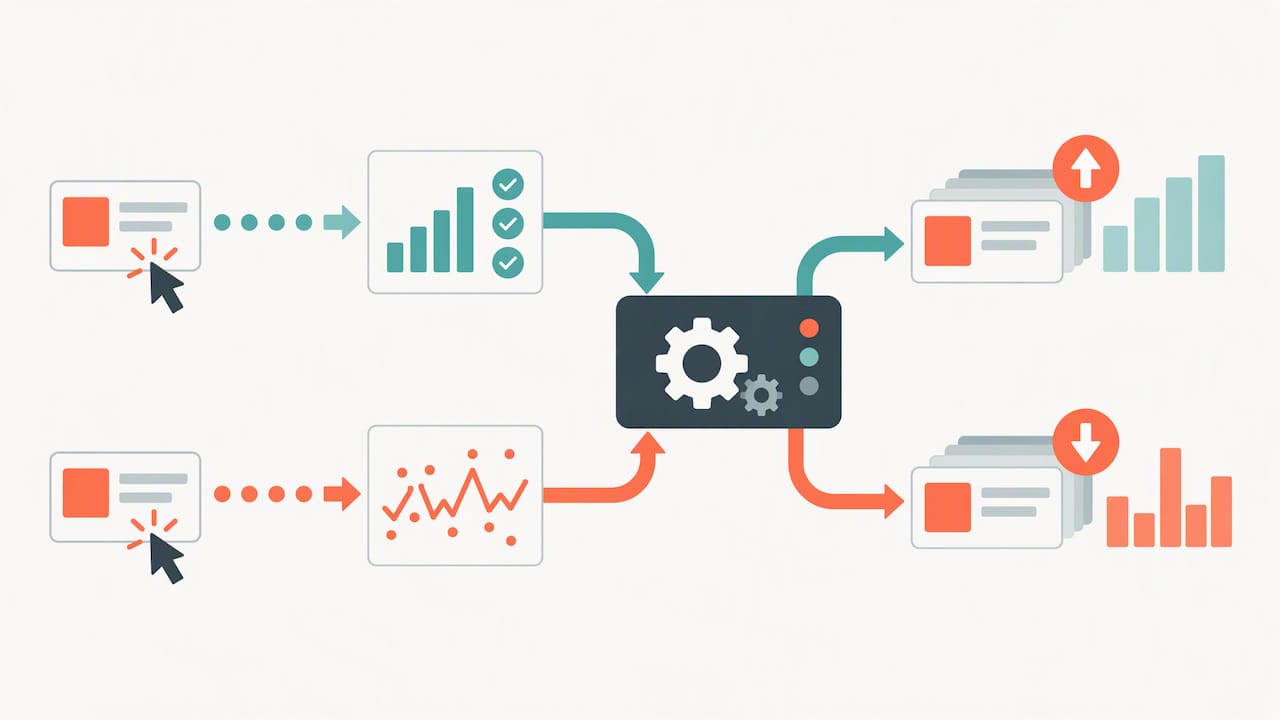
That last part matters more than most advertisers realize. Tracking is not only a reporting feature. Your conversion data is the feedback that automated bidding uses to decide how much each click is worth. Bad data means bad bidding, however good your ads look.
How it works under the hood
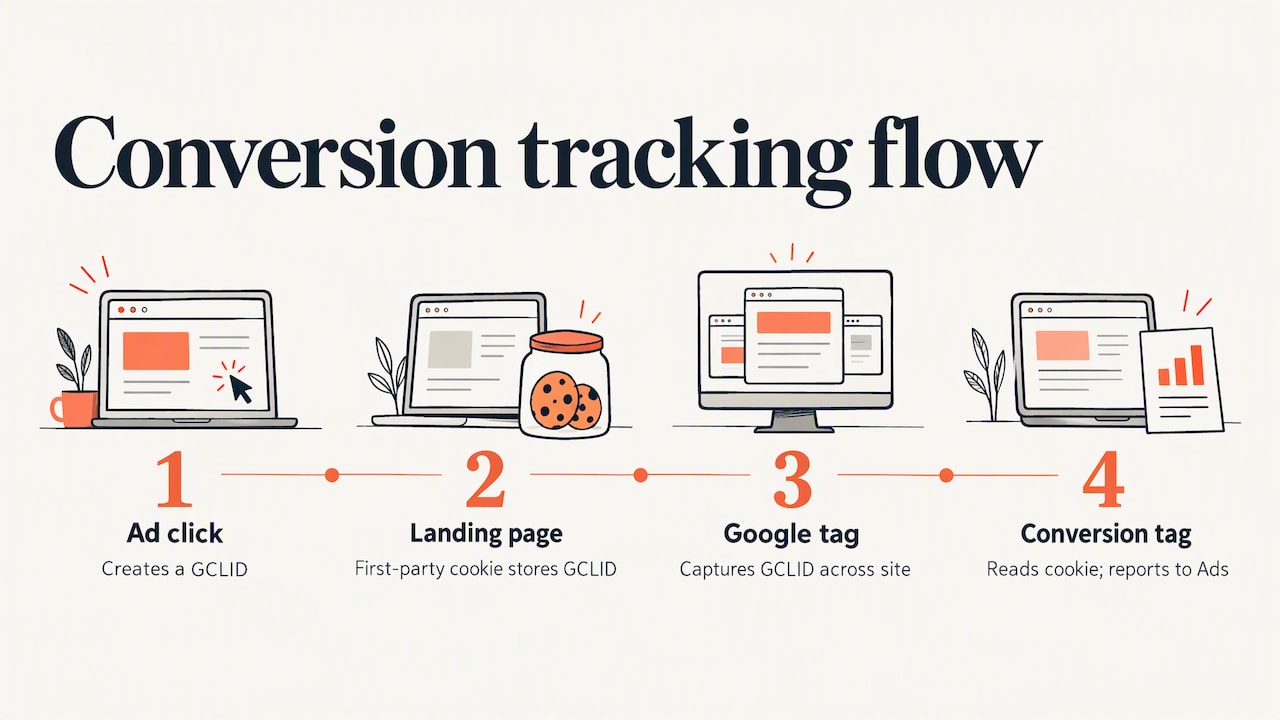
When someone clicks your ad, Google Ads stores information about that interaction, including a unique identifier, in a cookie. When that visitor later completes the action you configured, the conversion tag reads the cookie and sends the conversion to Google Ads.
Google recommends the Google tag for the most complete website measurement. It creates first-party cookies on your own domain and uses the GCLID (Google click identifier) to keep the ad-click information. This is why the tag belongs on every page, not just the thank-you page: the click identifier has to be captured when the visitor lands, not when they finish.
The same process can also cover people who watched a video ad and did not click.
What you can track: the conversion types that matter for leads
Google Ads can track website actions, app activity, phone calls and offline conversions. For a lead-generation account, these are the ones you will use most:
Conversion type | Typical lead example | Where it is recorded |
|---|---|---|
Website form submission | Contact form, consultation request, permit inquiry | Google tag plus an event on the thank-you page or form submit |
Calls from ads | Click-to-call on a search ad | Google Ads call reporting |
Calls to a number on your site | Visitor dials the number on your contact page | Website call tracking number |
Click on a phone number | Tap on a mobile site number | Event tag on the click |
Offline conversion import | Signed client, booked appointment, closed deal | Uploaded from your CRM or a file |
Google’s guidance is to set up a separate conversion action for each type of conversion you want to track. Resist the urge to lump a newsletter sign-up and a signed retainer into one bucket. They are not worth the same, and the account should know that.
How to set up conversion tracking, step by step
The screens in Google Ads change from time to time, so treat the labels below as a guide and follow Google’s current instructions for web conversions if a menu looks different.
Decide what a lead is. Write it down in one sentence before touching the account. For a law firm it might be a submitted case evaluation form or a call over 60 seconds. For a municipality it might be a service request, a newsletter signup for a program, or an event registration.
Create the conversion action. In Google Ads, open the Goals section and choose to add a new conversion action for your website. Name it so a colleague can read it a year from now, for example “Contact form, submitted.”
Install the Google tag. Put it on every page of the site, either directly or through Google Tag Manager. Google Tag Manager has its own path: open the conversion action and choose to use Google Tag Manager for the tag setup.
Fire the event on the right moment. The event should trigger when the form is successfully submitted, not when the page loads or the button is clicked. A thank-you page works if it can only be reached after a real submission. If your form stays on the same page, trigger on the form’s success event instead.
Set value and counting. For leads, count “one” conversion per click, since one person submitting twice is still one lead. Assign a value if you know what a lead is worth, even roughly.
Choose primary or secondary. Covered in the next section, because this one setting causes the most silent damage.
Test it before spending. Submit your own form from a test ad click or with the tag in preview mode, then confirm it registered.
Primary versus secondary: the setting that quietly breaks bidding
Primary conversion actions are the ones used for bidding. Secondary actions are observation only. Google warns that configuring these incorrectly can stop Smart Bidding from optimizing well.
This shows up in the reporting columns too. The “Conversions” column reports your primary actions and is generally what bidding optimizes toward. “All conversions” adds secondary actions and special sources such as view-through conversions, as Google explains.
A practical rule for lead accounts:
Primary: form submissions that represent a real inquiry, qualified phone calls, and imported offline outcomes.
Secondary: page views of the contact page, brochure downloads, button clicks, and anything that is a step toward a lead rather than the lead itself.
If a button click is primary, the system will happily find you more people who click buttons. Those people do not always want to hire a lawyer or file a permit.
A note on view-through conversions
A view-through conversion happens when someone sees your ad, does not interact with it, and converts later. Google reports these separately from the main Conversions column. For search-driven lead generation they are rarely the number to steer by. Look at them for display and video awareness, not for judging a search campaign.
Tracking phone calls and offline leads
For many service businesses, the phone is the real conversion. Google Ads can record calls directly from call assets, calls to the number on your site, and taps on a mobile number. Set each up as its own conversion action, with a minimum call length that filters out wrong numbers and hang-ups.
Then comes the harder part: what happened to the lead afterward. A form submission is a claim of interest. A signed client is a result. Google Ads supports importing offline conversions from files or APIs, which lets you report back which clicks became real business.
Google also offers enhanced conversions for leads, an upgraded form of offline import that adds user-provided data such as email addresses to improve accuracy. Google has been moving offline import uploads to a newer Data Manager API, so check the current Help pages or ask whoever builds your integration which route applies to your account today.
The workflow in plain terms:
Capture the GCLID (or the user-provided data) with each form submission and store it in your CRM or spreadsheet.
When a lead becomes a qualified opportunity or a client, mark it.
Upload those outcomes to Google Ads as a separate conversion action.
Once there is enough volume, let bidding optimize for the qualified action rather than the raw submission.
This is how an account stops buying cheap leads that never answer the phone and starts buying the ones that do.
Verify that tracking works, and keep checking
Two checks cover most problems. Use Google Tag Assistant to confirm the Google tag fires, and read the conversion action’s Status column, as Google recommends, to see whether it is recording.
Beyond that, a monthly sanity routine saves money:
Compare to the source of truth. Count form submissions in your inbox or CRM for a week, then compare with Google Ads conversions. Small gaps are normal. A gap of half is a tracking problem.
Watch for a sudden drop to zero. Site redesigns, new form plugins and cookie banner changes are the usual culprits.
Look for duplicates. If the same lead is counted by both a thank-you page tag and a form event, your cost per lead looks better than it is.
Re-test after any site change. A new website launch is the single most common moment for tracking to break unnoticed.
If you are changing an existing setup, edit the conversion action rather than creating a duplicate, and note the date. Bidding strategies need time to relearn after a change, so avoid judging results for the first couple of weeks.
Privacy and consent
Conversion tracking relies on cookies and user data, so the rules where your visitors live apply. Google says to give users clear information about the data collected and to obtain consent where law or Google policy requires it, and for advertisers in the European Economic Area to configure Consent Mode correctly.
If you serve only US visitors, your obligations differ from a business with traffic in Europe, and state privacy laws may add requirements. For a municipality or law firm, talk to your counsel or privacy officer about the banner and the privacy policy wording. We build the tracking; the legal judgment on consent belongs to them.
Our perspective: track the lead, not the click
We have managed over $3.2 million in ad spend for clients, and the pattern is consistent: accounts rarely fail because the ads are bad. They fail because the account is optimizing for the wrong thing.
A contact form that fires on every page load, a call tracked at three seconds, or a “conversion” that is really a button click will all produce a beautiful dashboard and a quiet phone. Our approach is to define the lead with the client first, build the tracking around that definition, and report in plain terms: how many real inquiries, from which campaigns, at what cost.
Our 6,252 views to 124 leads project and an immigration law campaign that drove 63 leads both started the same way, with measurement before spend. Clients who see transparent reporting make better decisions about budget, and that is what we mean by continuous optimization.
— User
Getting more leads from Google Ads once tracking is in place
Tracking does not generate leads on its own, but it makes every lever you pull measurable. With clean data, these are the changes that tend to move lead volume and quality:
Match the landing page to the ad. A visitor who clicked a search ad about a specific legal issue or city service should land on a page about exactly that, with one clear action. A generic homepage loses people.
Make the form short. Ask for what you need to follow up. Every extra field costs submissions, and you can see that cost in your own data once tracking works.
Use call tracking for local services. Many people searching for urgent help would rather call than type.
Review search terms weekly. Add negative keywords for terms that bring clicks but no leads.
Feed back lead quality. Imported offline outcomes teach bidding what a good lead looks like.
Budget realistically. If you are still sizing a first budget, our guide to what Google Ads costs a small business is a good starting point, and our piece on why paid media matters explains where it fits in the wider mix.
Let us set it up for you
If you would rather not spend your weekends in Tag Manager, this is exactly what we do. Media Click AI builds conversion-focused websites and runs Google and Meta campaigns for law firms, municipalities and businesses, with analytics and reporting included so you can see which clicks became leads.
See our services or browse recent work to see what measured lead generation looks like in practice. Pricing is scoped per project, so the quickest route is to tell us what you need through our site.
Common mistakes to avoid
Tracking only the thank-you page. Without the tag across the whole site, click identifiers can be lost.
Making everything primary. Bidding then optimizes for low-value actions.
Counting every submission as equal. A spam form and a retainer inquiry are not the same lead.
Never testing after a site update. Tracking breaks quietly.
Judging results too soon. Give changes time before concluding they failed.
Ignoring consent. Tracking that violates a regional rule is a liability, not an asset.
FAQ
How do I track conversions in Google Ads?
Decide what action counts as valuable, create a conversion action for it in Google Ads, and install the Google tag on your website. Then trigger the conversion on the specific event, such as a successful form submission. Test it with Tag Assistant and confirm the Status column shows it is working.
How many types of conversion tracking are there in Google Ads?
Google lists several families: website actions, app installs and in-app actions, phone calls, and offline conversions. You create a separate conversion action for each type you want to measure. Lead-focused advertisers usually combine website forms, calls and imported offline outcomes.
Why are my Google Ads conversions different from my CRM leads?
Some difference is normal because of consent choices, browser behavior and how each system counts. Large gaps usually mean a duplicate tag, a broken form event or conversions counted by the wrong trigger. Compare a week of CRM leads against Google Ads, then use Tag Assistant to find the cause.
When should I use conversion tracking?
Before you spend anything. Without it, you cannot tell which ads, keywords or campaigns produce leads, and automated bidding has nothing meaningful to learn from. If your campaign is already running without it, set it up now and treat earlier data as incomplete.