
Meta Ads Reporting: Build Reports That Drive Decisions
Learn how Meta Ads reporting works: what to include, how to build, export and schedule reports, and how to turn ad data into leads and decisions.

Meta Ads Reporting: Build Reports That Drive Decisions
Meta Ads reporting is the process of pulling your campaign data out of Meta’s advertising tools, shaping it into a report with the metrics and breakdowns that matter, and sharing it on a schedule so someone can act on it. Meta’s built-in Ads Reporting tool lets you create, customize, share, export and schedule reports on ad, ad set or campaign results. The tool is the easy part. Choosing what to measure, and what to do with the numbers, is where most reports fail.
This guide covers what a Meta Ads report can show, how to build one, how to save, export and schedule it, which metrics belong in it, and how to tell a useful report from a data dump.
MediaclickTurn Ad Data Into Better LeadsMedia Click uses data-backed advertising strategies and conversion-focused websites to help businesses turn online clicks into qualified leads.Explore Media Click
TL;DR
A Meta Ads report is a saved view of metrics (spend, results, cost per result) split by breakdowns such as placement, country or creative.
You need administrator, advertiser or analyst access to the ad account to create or schedule a report.
Reports can be exported as CSV or XLSX, shared by link, or emailed on a recurring schedule for single-account reports.
Report on business outcomes first (leads, cost per lead, revenue), then on delivery metrics (CPM, CTR, CPC) that explain why.
A good report ends with a decision: what to pause, scale or test next.
Table of Contents
What a Meta Ads report actually shows
Ads Manager views versus Ads Reporting
How to create a report in Meta Ads Reporting
Which metrics and breakdowns belong in the report
Saving, exporting, sharing and scheduling
Pulling Meta data into your own dashboards
What makes a report useful instead of decorative
What campaign reporting services provide
Perspective: reports exist to change what you do next
Getting help with reporting that connects to leads
A reporting checklist you can use this week
FAQ
Sources
What a Meta Ads report actually shows
A report is a configured view of your campaign data. Meta’s developer documentation describes dedicated views of columns and breakdown data for campaign analysis. Available metrics include amount spent, impressions, link clicks, results, CPM, CTR, CPC and cost per result. Breakdowns include demographics, country, placement and creative assets.
That gives you two axes to think about:
Metrics answer “how much and how well?” Spend, results, cost per result, click-through rate.
Breakdowns answer “where and for whom?” Age and gender, country, Facebook feed versus Instagram Stories, one creative versus another.
A total cost per lead of $60 tells you little. The same number split by placement might show $35 on one placement and $140 on another. That split is the insight, and it is what a report exists to surface.
Ads Manager views versus Ads Reporting
Meta gives you two places to look at performance, and they serve different jobs.
Ads Manager (table view) | Ads Reporting | |
|---|---|---|
Best for | Daily checks and quick edits | Repeatable, shareable analysis |
Layout | Campaign, ad set and ad rows with columns | Pivot table, trend line or bar chart |
Saved setup | Column presets | Saved reports |
Sharing | Screenshot or export | Link, file export, scheduled email |
Use Ads Manager when you are inside the account making changes. Use Ads Reporting when someone else needs to read the numbers: a partner, a board, a city council, a managing partner at a law firm.
How to create a report in Meta Ads Reporting
The exact menu labels shift as Meta updates the interface, but the flow has stayed consistent.
Open Ads Reporting. Meta places it under the “Analyse and report” menu in the main navigation. You can also open the Export drop-down in Ads Manager and choose to create a custom report.
Confirm your access. Meta states you should have administrator, advertiser or analyst access to the ad account associated with the report.
Select the ad accounts the report should cover.
Choose a format: a pivot table, a trend line chart or a bar chart.
Add breakdowns, metrics and filters, then save the report.
If you manage more than one account, remember that cross-account reports cannot be scheduled for email. Meta notes that scheduling is for single-account reports.
Pick the right format for the question
Pivot table: best when you want to compare many rows, for example every ad in a campaign across cost per result and CTR.
Trend line: best for pacing and fatigue. Does cost per result climb as frequency rises?
Bar chart: best for a single comparison in a slide, such as cost per lead by placement.
Which metrics and breakdowns belong in the report
Meta’s documentation says you can use the Columns configuration to add performance, engagement and conversion metrics and save your selection as a reusable Column Preset. Build one preset per reporting purpose rather than one giant preset with 40 columns.
Tier 1: outcomes
These are the numbers the person paying the bill cares about.
Results (leads, purchases, form submissions, calls, depending on the campaign objective)
Cost per result
Amount spent
Downstream value from your own systems: qualified leads, booked consultations, signed clients, revenue
The last item matters most and Meta cannot give it to you alone. A lead that never answers the phone is a result in Ads Manager and a cost in real life. Pair Meta data with your CRM or call tracking. Our guide on tying phone leads to ads with call tracking shows how to close that gap.
Tier 2: efficiency drivers
These explain why Tier 1 moved.
CPM (what it costs to reach 1,000 impressions)
CTR and CPC (does the creative earn the click, and what does each click cost)
Frequency (how often the same person sees your ad)
Landing page conversion rate, from your analytics
A rising cost per lead with stable CPC points to your landing page or lead quality. A rising CPM with falling CTR points to audience saturation or tired creative. Reading metrics in this order turns a table of numbers into a diagnosis.
Tier 3: breakdowns
Add breakdowns only when they answer a question you actually have.
Placement: feed, Stories, Reels. Often the largest cost difference in an account.
Creative asset: which image, video or headline carries the campaign.
Demographics: useful for services with a defined client, such as a practice area or a resident program.
Country or region: essential if you target multiple cities or states, or if a municipality wants to confirm reach stays in its own community.
A simple starter layout
For a lead generation campaign, a one-page monthly report might contain:
Section | Content |
|---|---|
Headline | Spend, leads, cost per lead, qualified leads, cost per qualified lead |
Trend | Weekly cost per lead as a line chart |
Breakdown | Cost per lead by placement and by creative |
Notes | What changed this month (new ads, budget shifts, seasonality) |
Next steps | Two or three specific actions with owners |
Saving, exporting, sharing and scheduling
Once the report answers your questions, make it repeatable.
Save it. A saved report keeps your metrics, breakdowns, filters and chart type, so next month’s version takes seconds.
Export it. Reports can be exported as CSV or Excel (XLSX) files, which is useful when you want to combine Meta data with CRM data in a spreadsheet.
Share it. You can share a report by copying a link. One caution from Meta: only people with permissions on the ad account can open it. If you want to share results with someone who should not have account access, export the report and send them the file instead. This is the right approach for most outside stakeholders, since giving someone account access also gives them access to billing-adjacent information and campaign controls.
Schedule it. To set up a recurring email, open the saved report, turn on the schedule email option (either under the report name or in the report settings cog), add the recipient and click apply, then save. Meta describes this as a way to have a report emailed to yourself or someone else on a recurring basis.
A practical cadence:
Weekly: a short email for the person managing the campaigns. Spend, results, cost per result, anything unusual.
Monthly: the full one-page report for decision makers, with commentary.
Quarterly: a trend review that looks at creative lifespan, seasonality and budget allocation.
A scheduled email is a delivery mechanism, not analysis. Pair it with a short written note, otherwise recipients learn to ignore it.
Pulling Meta data into your own dashboards
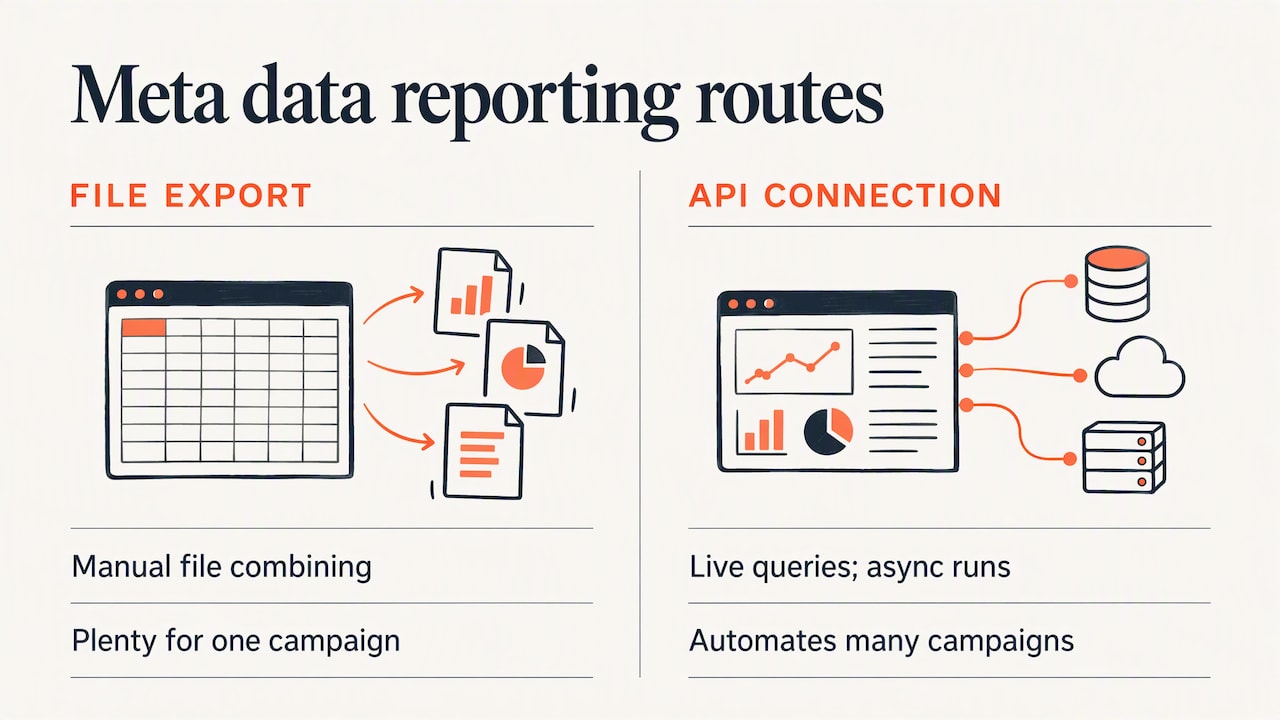
If you report across several channels, you will eventually want Meta data next to Google Ads, website analytics and CRM records. There are two common routes: exporting files and combining them manually, or using an API-based connection. Third-party integrations expose programmatic access to Meta ad insights through live queries and asynchronous report runs. For a single campaign, the file export is plenty. Automation pays off when you report on many campaigns or need a live dashboard.
Whichever route you choose, define each metric once and keep the definition constant. “Lead” should mean the same thing in the Meta report, the CRM and the executive summary.
What makes a report useful instead of decorative
Most bad reports share the same flaws.
They lead with vanity metrics. Impressions and reach are context, not results.
They report platform results, not business results. Ten leads on Meta can be two real clients.
They show numbers without comparison. Compare to last period, to target and to a benchmark you set yourself.
They bury the decision. The reader should find the recommendation in the first screen.
They change every month. If the layout changes, trends cannot be read.
A useful test: could the recipient, after thirty seconds, say what you want them to approve or change? If not, rewrite the top of the report.
An example of insight from a breakdown
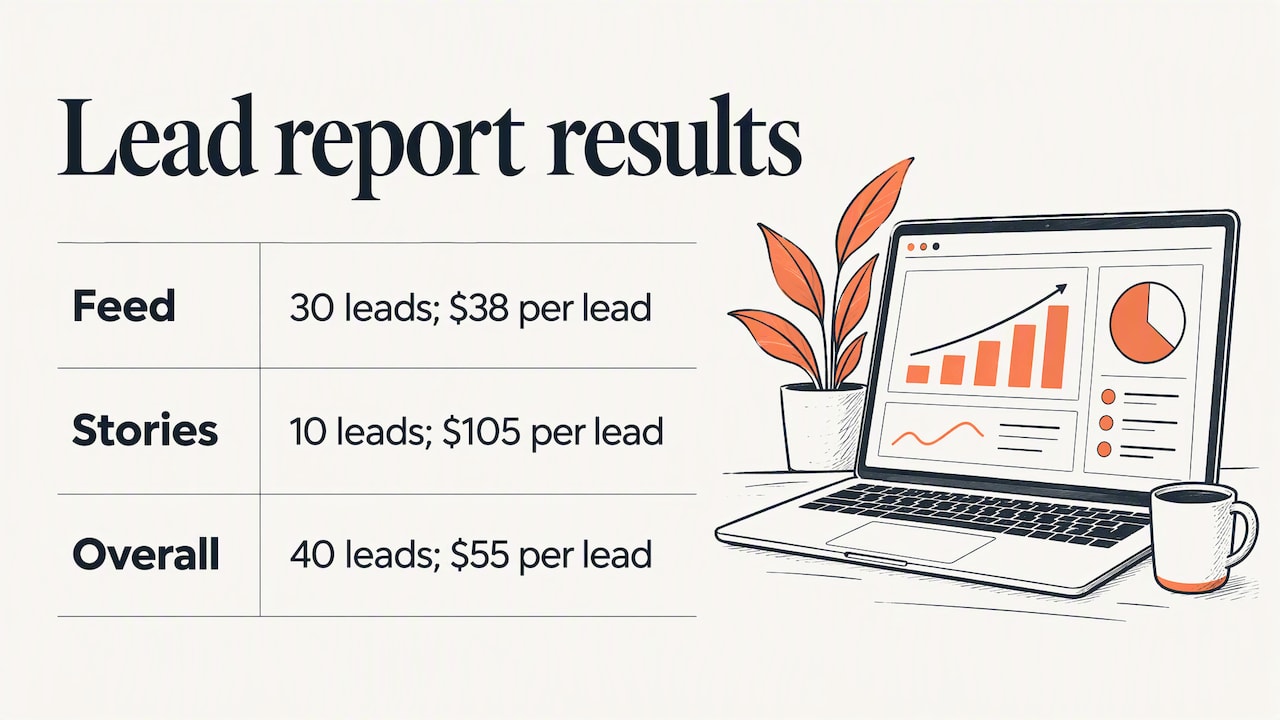
Imagine a local law firm running one lead campaign across feed and Stories. The headline report shows 40 leads at $55 each. The placement breakdown shows feed delivering 30 leads at $38 and Stories delivering 10 at $105. The recommendation writes itself: shift Stories budget into feed, test a vertical video built for Stories, and review again in two weeks. The numbers here are illustrative, but the pattern is exactly what breakdowns are for.
What campaign reporting services provide
People who search for campaign reporting services usually want one of three things: a dashboard built for them, a regular written analysis, or a team that connects ad data to leads and revenue. A solid reporting service typically covers:
Setup and tracking: making sure pixels, conversion events and call tracking record the right actions, so the data is trustworthy before anyone reads it.
Consolidation: bringing ad platforms, website analytics and lead sources into one view.
Regular reporting: a fixed cadence with consistent definitions.
Interpretation: commentary that explains movement and recommends action.
Optimization: acting on the findings, with the result of each change reported afterward.
When you compare options, ask who owns the data, whether you can see the raw account, and whether reports describe lead quality or only lead counts. Reporting that stops at clicks is a weak service no matter how good the dashboard looks.
Perspective: reports exist to change what you do next
We run paid media for municipalities, law firms and local businesses, and one lesson repeats: the report is only as good as the question it was built to answer. A clicks-and-impressions summary can look healthy while the phone stays quiet. So we start from the outcome the client signs the contract for, whether that is consultation requests, resident engagement or qualified inquiries, and work backward to the metrics that explain it.
We also treat transparency as a requirement. Clients should see their own numbers, understand how each is defined, and know what we changed because of them. That is the approach behind our analytics and reporting work, and it is how we have managed more than $3.2 million in ad spend. Our Google Search campaign write-up shows the idea in practice: the story is about 6,252 views becoming 124 leads, and the reporting is what showed us where those leads came from.
For municipalities the question is slightly different. Reach inside the community, accessibility and resident response matter as much as cost per result, so the report needs to be readable by a council or committee, not just a marketer.
— the author
Getting help with reporting that connects to leads
If you would rather have someone build the tracking, the reports and the optimization loop for you, that is what we do. Mediaclick combines paid media on Google and Meta, conversion-focused websites and transparent analytics and reporting for municipalities, law firms and businesses. Pricing is custom and scoped per project, so the quickest way to see whether we fit is to look at our services and tell us what you want your reports to prove.

You can also see how this plays out in a campaign such as our immigration law campaign that drove 63 leads, or browse all of our work.
A reporting checklist you can use this week
Write down the single business outcome the campaign is meant to produce.
Confirm tracking: does a test conversion appear in Ads Manager?
Create one Column Preset for outcomes and one for efficiency.
Build a saved report with a trend line and a placement or creative breakdown.
Export a file and add your CRM’s qualified lead count beside Meta’s lead count.
Schedule a weekly email to yourself and a monthly file for stakeholders.
Add a three-line note to every report: what changed, why we think it changed, what we do next.
If your spend is still being planned, our posts on why paid media matters and what local business advertising costs help set realistic expectations before you read your first report.
FAQ
What is a Meta Ads report?
It is a saved, customizable view of your ad performance built in Meta’s Ads Reporting tool. You pick the metrics, breakdowns and filters, and Meta lets you share, export and schedule it. The report can cover ads, ad sets or whole campaigns.
How do I get a report from Meta Ads?
Open Ads Reporting from the Analyse and report menu, or choose to create a custom report from the Export menu in Ads Manager. Select your account, a chart format, metrics and breakdowns, then save. You need administrator, advertiser or analyst access to the account.
How do I schedule a Meta ad report?
Open the saved report, turn on the schedule email toggle, add the recipient and apply, then save. This works for single-account reports only. Cross-account reports cannot be scheduled for email, according to Meta’s help page.
Can I share a report with someone who is not on my ad account?
A shared link only opens for people who have permissions on the ad account. For anyone else, export the report as CSV or XLSX and send the file. That keeps account access limited to the people who need it.
Which metrics matter most in a Meta Ads report?
Start with results, cost per result and amount spent, then add CPM, CTR, CPC and frequency to explain changes. Whenever you can, add qualified leads or revenue from your own systems. Platform results alone do not show whether the campaign made money.