
Manufacturing Web Design: What Makes a Site Win Buyers
Manufacturing web design that helps engineers and buyers find specs, trust your capabilities and request a quote. Structure, content, mistakes and cost drivers.

Manufacturing Web Design: What Makes a Site Win Buyers
A good manufacturing website does one job: it helps a technical buyer decide, quickly, that you can make the part, meet the standard and deliver on time, then makes it easy to ask for a quote. Everything else, from the hero image to the footer, either serves that decision or gets in its way. This guide covers how to structure a manufacturer’s site, what content buyers need, the mistakes that cost inquiries, and what drives the price of a project.
MediaclickTurn Your Website Into a Lead ToolMediaclick builds conversion-focused websites and data-backed marketing strategies to help businesses turn online clicks into qualified leads.Explore website solutions
TL;DR
Design for the buyer’s evaluation: capabilities, materials, tolerances, certifications and a clear way to request a quote.
Organize navigation around what you make and what you can do, not around your company history.
Treat speed, mobile layout and accessibility as part of the design. Google’s Core Web Vitals and the W3C’s WCAG 2.2 give you measurable targets.
Costs depend on scope: number of products, technical content, integrations and content production. Expect custom quotes, not a fixed price.
Measure the site by qualified inquiries, not by traffic.
Table of Contents
How a manufacturing website differs from a general business site
Why a purpose-built site matters
What to put on a manufacturer’s website
Navigation, technical content and calls to action
Speed, mobile and accessibility
Common mistakes to avoid
Our perspective: a site is a lead system
How much manufacturing web design costs
How to start a redesign
Work with Media Click AI
FAQ
Sources
How a manufacturing website differs from a general business site
A typical small-business site sells to someone who decides in minutes. A manufacturer’s buyer is often an engineer, a purchasing manager or both, and the decision is slower and shared. One person checks whether you can hold a tolerance or work in a given alloy. Another wants to know about lead times, certifications and minimum order quantities. A third signs off on the supplier. Your site has to satisfy all three without a phone call.
That changes the design in four ways:
Depth over polish. Visitors expect specifications, material lists, process descriptions and downloadable documents. A beautiful page with no data is a dead end.
Several audiences on one site. Engineers, buyers, distributors and sometimes job seekers all arrive. Each needs a path.
Long consideration cycles. Visitors return several times and share pages internally, so pages must make sense on their own and be easy to link, print or save as PDF.
Quote requests, not carts. In most cases the conversion is a request for quote (RFQ), a sample request or a call with an engineer.
Why a purpose-built site matters
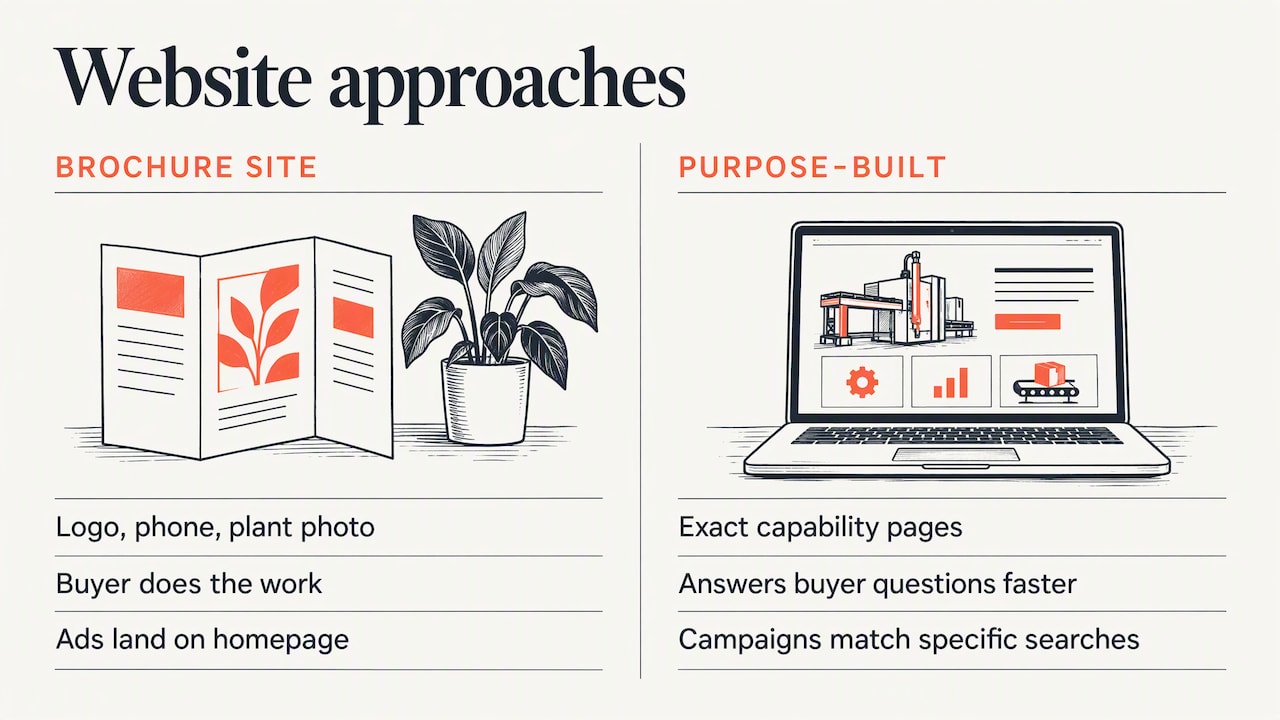
Many manufacturers run a site built years ago: a brochure with a logo, a phone number and a photo of the plant. It may be accurate, but it makes the buyer do the work. When a buyer is comparing several suppliers, the one whose site answers questions fastest tends to get the first call.
A purpose-built site also becomes a sales asset. Sales reps can send a link to the exact capability page instead of attaching a deck. Marketing can run Google and Meta campaigns to specific product or capability pages that match the search. Without those pages, ad spend lands on a homepage and leaks.
What to put on a manufacturer’s website
Start with what a technical buyer asks in the first two minutes. If the answer is not visible, they leave.
Capabilities and processes
List each process you run (machining, injection molding, fabrication, assembly, finishing, whatever applies) on its own page. For each, state:
Materials you work with
Size and volume ranges, from prototype to production
Achievable tolerances and surface finishes
Equipment, in plain terms
Typical lead times, as a range
Separate pages also give search engines something specific to match against queries such as a process plus a material.
Product and part detail
If you sell a catalog, each product needs a page with specifications in a scannable table, downloadable data sheets, drawings or CAD files where you can share them, and a visible quote or sample button. Use consistent attribute names across products so buyers can compare.
Proof you can be trusted
Certifications, quality systems, industries served and named customers (with permission) belong high on the page, not buried in an About section. Short case studies work best when they state the problem, the part or product, the constraint and the outcome. If you cannot name the customer, describe the situation anyway.
Facility and people
Real photos of your plant, equipment and team do more than stock imagery. Buyers are deciding whether to hand over a critical component. Show them who they will be working with.
Contact and quote paths
Give the RFQ form its own page and link to it from everywhere. Keep it short: name, company, email, what they need, and a file upload for drawings. Add a phone number and a named contact for urgent questions. Every extra required field costs you submissions.
Navigation, technical content and calls to action
Navigation that matches how buyers search
Keep the top level to five or six items. A workable structure for most manufacturers:
Menu item | What it holds | Main visitor |
|---|---|---|
Capabilities | One page per process | Engineer |
Products or Materials | Catalog or material guides | Engineer, buyer |
Industries | Pages by sector served | Buyer, executive |
Quality | Certifications, inspection, compliance | Buyer, quality manager |
Resources | Data sheets, guides, case studies | Engineer |
Contact / Request a Quote | RFQ form and contacts | Everyone |
Name items by what they contain. Labels like “Solutions” or “Why Us” force a click to find out what is inside.
Technical content without clutter
Put the summary on the page and the depth one click away. A capability page can show a short overview, a spec table and a data sheet download. Gate only what is truly valuable, and think twice before gating spec sheets: an engineer who hits a form wall may simply move to the next supplier.
Calls to action at the right moments
Different visitors are ready for different steps. Offer a primary action (Request a Quote) and a lighter one (Download the capabilities sheet, Talk to an engineer). Place them after the spec table, after a case study and at the end of each capability page, not only in the header.
Speed, mobile and accessibility
Plant managers and buyers check suppliers on phones between meetings, and engineers open data sheets on tablets on the shop floor. A site that is slow or cramped on a small screen loses them.
Performance. Google’s guidance on Core Web Vitals recommends measuring both mobile and desktop experiences and names metrics for loading performance (LCP), interactivity and visual stability (CLS). Manufacturing sites often fail here because of oversized product photos, embedded video and heavy sliders. Compress images, serve modern formats and load video only when requested.
Accessibility. The W3C’s WCAG 2.2, a Recommendation dated December 12, 2024, covers content on desktops, laptops, kiosks and mobile devices, and notes that following it often makes content more usable for people in general, not only for people with disabilities. For a manufacturer that means readable contrast on spec tables, keyboard-friendly forms, text alternatives for drawings and diagrams, and labeled form fields. If you sell to public agencies or large enterprises, accessibility questions may also appear in procurement.
Structured data. Google’s documentation explains that structured data helps computers understand page content, with JSON-LD, Microdata and RDFa as supported formats. It does not guarantee rich results, so treat it as clean labeling of your organization, products and contact details rather than a ranking trick.
Common mistakes to avoid
A homepage that never says what you make. Name your products or processes and your industries in the first screen.
Stock photos of generic factories. Buyers can tell. Use your own floor, parts and people.
Specs locked in PDFs only. PDFs are fine as downloads, but the key numbers should also be on the page where search engines and phones can read them.
Capabilities crammed on one page. One page per process or product family gives you something to rank, advertise and link to.
A long, demanding quote form. Ask for the minimum, then follow up.
No proof. Certifications, customer types and results should appear near the action buttons.
Ignoring mobile. Test forms and tables on a real phone.
Launching without measurement. If you cannot see which pages produce quote requests, you cannot improve them.
Our perspective: a site is a lead system
We come at manufacturing web design from the advertising side, and that shapes how we build. We have managed over $3.2 million in ad spend and seen clients reach a 10x return on ad spend, and the pattern is consistent: traffic is rarely the problem. The problem is what happens after the click. A visitor from a search ad lands on a page that does not match what they searched, cannot find a spec or a next step, and leaves.

So we design the site and the campaign together. Each service line gets a page that answers the question behind the search, with clear proof and one obvious action. Then we track the whole path, from ad to page to inquiry, and report on it plainly. Our published case study, titled “6,252 Views to 124 Leads”, shows the kind of tracking and page-level thinking we apply. We have also built a civic website and brand modernization for a New Jersey borough, where the discipline is the same as in manufacturing: many audiences, plain language, and a clear route to the thing each visitor came for.
Our view is that clarity beats cleverness. If an engineer can confirm in one minute that you are a fit, the rest of the design has done its job. For more on how layout choices affect inquiries, see our notes on design that converts, and on the platform question, Webflow versus custom code.
— User
How much manufacturing web design costs
There is no honest flat price, because manufacturing sites vary enormously. A ten-page site for a single-process shop and a multi-division catalog with thousands of parts are different projects. The main cost drivers are:
Number and type of pages. Capability pages, product pages, industry pages and case studies each need design, content and review.
Content production. Photography of the plant and parts, copywriting with engineering input, and data sheet preparation often take more time than the design itself.
Catalog size and structure. A large product catalog may need a content management structure with filterable attributes rather than hand-built pages.
Integrations. ERP or CRM connections, quote workflows, file uploads and analytics setup.
Platform choice. A visual platform such as Webflow suits many marketing sites. Custom code makes sense for unusual requirements.
Ongoing work. Hosting, maintenance, performance monitoring, content updates and advertising.
Projects like this are scoped and quoted individually. Ask any agency for a scope broken into deliverables, so you can compare like with like and see what is included for content, migration of existing pages and measurement.
How to start a redesign
Interview your sales team. Collect the questions buyers ask before they request a quote. Those become your page outlines.
Audit the current site. List pages, find which ones get inquiries, and note slow or broken pages on mobile.
Define the conversion. Is it an RFQ, a sample request or a call? Choose one primary action.
Map the content. For each capability and product family, list the specs, proof and files you can provide.
Design the structure first. Agree navigation and page templates before visual styling.
Build for speed and accessibility from the start. Retrofitting is harder than planning for it.
Launch with tracking. Set up forms, events and reporting so you can see what produces inquiries, then refine.
Work with Media Click AI
If you want a manufacturing site that earns qualified inquiries, our team handles web design, brand design and paid media as one connected project, with analytics and reporting so you can see what is working. You can also browse our work to see how we present results.
FAQ
What should a manufacturing website include?
At minimum: pages for each capability or product family, specifications and downloadable data sheets, certifications and quality information, proof such as case studies, and a short quote request form. Add real photos of your facility and a named contact. Together these let a technical buyer evaluate you without calling first.
How long does a manufacturing website redesign take?
It depends on page count, content readiness and integrations. Content is usually the slowest part, because specs, photos and approvals need input from engineers and sales. A clear scope and a content owner on your side keep the project moving.
Should I gate spec sheets behind a form?
Usually not for core specifications. Engineers evaluating suppliers often leave when asked for details too early. Keep the key data open and gate only high-value material, such as detailed guides, if you need to capture leads.
How do I know if my manufacturing site is working?
Track qualified inquiries, not just visits. Measure quote form submissions, downloads and calls by page and by traffic source, then check mobile speed and usability. If traffic is rising and inquiries are flat, the pages or the offer need work.